
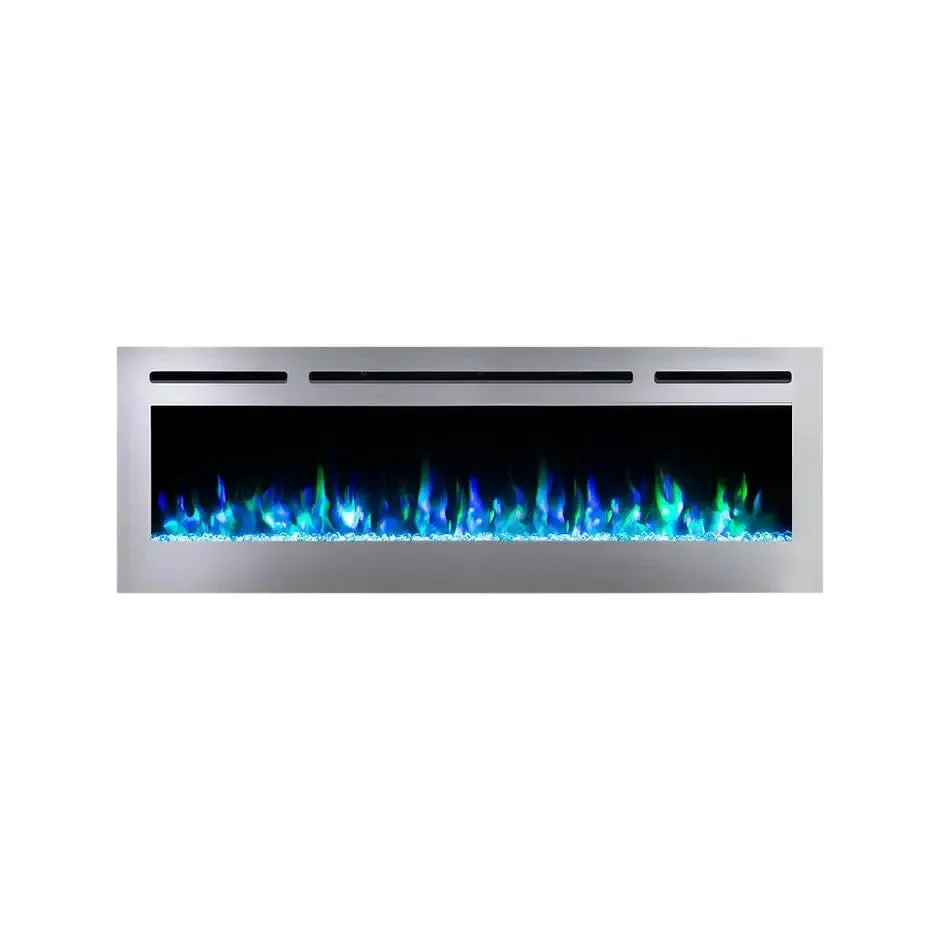
The Sideline Deluxe® Stainless Steel 60 Electric Fireplace by Touchstone offers a sleek design and realistic flame display. With versatile installation options, this striking contemporary designed electric fireplace adds ambiance and supplemental heat to any room.
- Beautiful stainless steel frame in a high-end, modern style
- Wi-Fi enabled for smart home connectivity and mobile app controls
- Compatible with Amazon Alexa® and Google Home®
- 9 flame/base color combinations, 5 flame intensity settings
- Includes log set and crystal set
- Supplemental heat up to 400 square feet (5,000 BTUs)
- Can be plugged in or hardwired 120V
- Thermostat (62 – 82F) for heat
What’s Included
- Sideline Deluxe Electric Fireplace
- Faux Logs
- Clear Crystals
- Remote Control
- Mounting Bracket
Features
Safe Mounting Space: To ensure safety, it is recommended to place the Sideline® electric fireplace at least 8 inches below a mounted flat screen TV. The Sideline Deluxe® Stainless Steel 60 inch Smart Electric Fireplace is designed to be recessed into a wall, but it can be simply mounted onto the flat wall surface. We recommend placing the fireplace at least 6 inches from the floor.
Easy Operation and Controls: Control the power, heat, and flame settings using the touchscreen on the unit, the remote control, or the mobile app. It is compatible with voice commands through Amazon Alexa® and Google Home®. The fireplace includes a remote control and instructions for Wi-Fi connectivity.
9 Flame Colors, Realistic Display: Enjoy the best-in-class LED flame display with 9 adjustable flame colors and 5 intensity settings. The flame display can be easily customized through the remote control or mobile app. The Sideline® Stainless Steel Smart Electric Fireplace also comes with both a faux log and glass crystals, allowing you to choose between a modern or traditional look.
Energy Efficient and Cool to the Touch: Compared to gas or wood burning fireplaces, this electric fireplace is more energy efficient and cleaner. It doesn’t emit gas fumes, smokey smells, soot, or ashes. Additionally, the cool-to-touch glass front makes it a safer option around pets and children.
Highlights
- 2 heat settings (high and low)
- Designed for in-wall recessed mounting
- Remote control for heat and flame setting (batteries not included
- Flame display dual mode operates with or without heat
- Built-in timer mode for shut off in 30 minutes to 7.5 hours
- 9 flame color options
- 9 ember bed color options
- Faux Fire Log and Glass Crystal Media Options
Specifications
| Frame Color | Stainless Steel |
| Fireplace Dimensions | 60.0″ W x 21.5″ H x 5.5″ D |
| Firebox Dimensions | 57.0″ W x 20.25″ H x 5.25″ D |
| Rough Opening Dimensions | 57.25″ W x 20.5″ H x 5.75″ D |
| Shipping Carton Dimensions | 65.0″ W x 26.0″ H x 9.0″ D |
| Fire Dimensions | 50.375″ W x 12.0″ H |
| Part Number | 86277 |
| Heater Type | Coil wire heater with blower |
| Watts | 1,500 |
| BTU’s | 5,000 |
| Room Coverage | 400 sq ft |
| Fireplace Weight | 70 lbs |
| Shipping Weight | 80 lbs |
| Voltage | 120v |
| Amperes | 11 and up |
Touchstone Fireplace Wi-Fi Setup Guide
Start here for connecting your Touchstone® Smart Fireplace to the Touchstone® Fireplace App, Amazon Alexa® and Google Home®.
- Is your fireplace WiFi Compatible? Look for the “WiFi” image on your control panel. If you see the logo you are ready to go.
Just a reminder, connecting to the Touchstone Fireplace App or using Amazon Alexa or Google Play is not required for standard operation. Touchstone included remote will handle all the functions of the fireplace.
Have questions about compatibility? Scroll down for a list of compatible fireplaces.
Start here: Get the Touchstone Fireplace App
Set Up the Touchstone Fireplace App
Once you have downloaded the app to your mobile device, open the Touchstone Fireplace App, tap “Sign in” to register an account, and then sign in. (The app can be used as a “guest”, but you may miss out on some support functionality). Follow the app instructions to set up, register an account and sign in to the app.
Notes:
- Your phone will request permission for the “Touchstone Fireplace” to find and connect to devices on your network.
- The Touchstone Fireplace App will also request to access Bluetooth devices.
- This enables simple product pairing through the app’s Bluetooth pairing.
- The Touchstone Fireplace App will be not fully functional without these permissions.
Add Your Touchstone® Smart Electric Fireplace to the Touchstone Fireplace App
For Fireplaces purchased AFTER November 2022:
- After signing in or creating an account, add your device using the simple Bluetooth pairing. The Bluetooth pairing easily finds your powered-on fireplace.
For Fireplaces purchased BEFORE November 2022:
- Your fireplace doesn’t have Bluetooth connectivity, so you’ll need to pair your fireplace by selecting the “+” from the upper corner of your “All Devices” window. Here, you will be directed to the “Add Device” page, where you will select the Touchstone logo.
- This will walk you through resetting your fireplace for pairing. In the upper corner select “Bluetooth” and then change your option to “EZ Mode”. Follow the instructions for walking through pairing in EZ mode. You’ll need to be ready with your WiFi login and password.
Need more help? Refer to the Touchstone Quick Start Guide for step-by-step instructions. (Check Documents and Files section for this file)
Set Up Your Touchstone Fireplace for Amazon Alexa or Google Home Pairing
- You can use your Touchstone Smart App to connect your smart fireplace to Alexa or Google Play.
- An important first step in using your fireplace with Amazon Alexa or Google Home is to change the device name to the word or phrase you will use for voice commands, i.e. Alexa, turn on the fireplace. You must use your designated phrase, i.e. “fireplace” in your voice commands for Alexa and Google Home to control your fireplace. See more about voice commands below.
- Once you’ve paired the fireplace in your app, it is easy to walk through Alexa or Google Home pairing by clicking on your fireplace in the app, clicking on the “edit” icon in the upper right corner and then selecting Alexa or Google Assistant icons under “third party control” Have your Alexa or Google Home login ready.
Using Amazon Alexa and Google Home Voice Commands:
The Amazon Alexa and Google Home compatibility allow you to use voice commands to control your fireplace when paired using the Touchstone Fireplace App.
Examples: Turn the Fireplace On and Off and Adjust the Heat Temperature
Google Home Voice Commands For Your Fireplace
“Hey Google, turn on
“Hey Google, turn off
“Hey Google, set heat to
Amazon Alexa Voice Commands For Your Fireplace
“Alexa, turn on
“Alexa, turn off
“Alexa, set heat to
For a full list of compatible voice commands: Check Documents & Files section for this file
Watch this video to learn how to operate the Touchstone Fireplace App
Updating the firmware on your Touchstone Fireplace
Visit our Updating Your Fireplace’s Firmware article for instructions on updating your firmware to the last version. (Check Documents & Files section for this file)


Reviews
There are no reviews yet.